ADSR Envelopes: Attack, Decay, Sustain and Release Explained
Published November 12, 2026
ADSR stands for attack, decay, sustain and release. These four controls describe a common envelope: a shape that changes a sound parameter over time. When the envelope controls amplitude, it shapes how a note rises, holds and fades.
The key distinction is that attack, decay and release describe times, while sustain describes a level. Holding a note longer extends the sustain stage; turning up sustain raises its level.
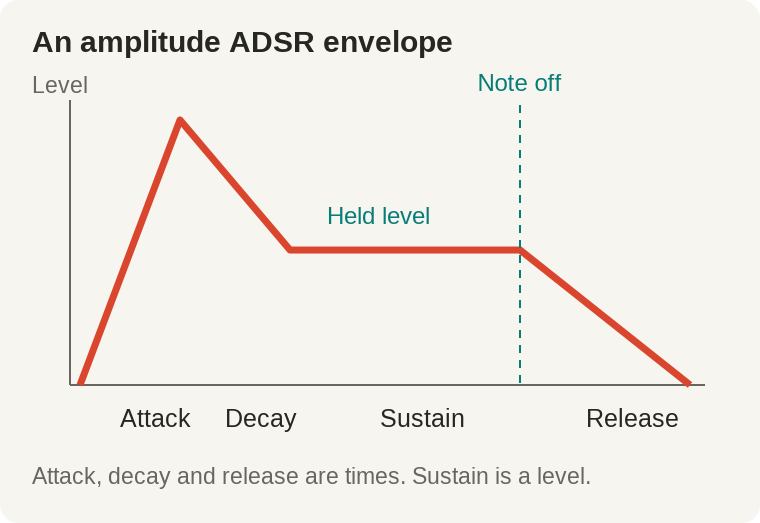
Sustain is a level, not a duration. The held portion can last until the note is released.
Read the four stages
In a simple amplitude ADSR, a note-on starts the attack. While the note remains held, the envelope can pass through attack and decay into sustain. A note-off starts the release.
| Stage | What it controls | What to listen for |
|---|---|---|
| Attack | Time taken to rise toward the initial peak | A quick entrance or a gradual swell |
| Decay | Time taken to move from the peak toward sustain | A fading initial accent |
| Sustain | Level maintained while the note stays held | A continuing body after the initial peak |
| Release | Time taken to fade after note-off | A short ending or a lingering tail |
The diagram shows a note held long enough to reach sustain. A shorter note can be released during attack or decay; its release then begins from the current level. Ableton’s interactive envelope lessons demonstrate the difference between decay time and sustain level.
Start with three sound shapes
For a plucked shape, try a quick attack, a falling decay and a low or zero sustain level. The initial energy fades even if you keep holding the note. Set release according to how abruptly you want the ending to stop.
For a sustained shape, use a quick attack and a substantial sustain level. With sustain at the same level as the initial peak, there is no level difference for the decay to traverse. The note can continue while held, provided its sound source can sustain.
For a swelling pad, lengthen the attack and leave enough note duration for the swell to become audible. A longer release can connect the ending to the next chord. Too much overlap may blur a harmony change, so listen in the full arrangement.
These are starting shapes, rather than exact imitations of acoustic instruments. An envelope changes one aspect of timbre; the source waveform, filtering and performance also affect the result.
The same shape can control something else
An amplitude envelope changes signal level. A filter envelope can move a filter’s cutoff, changing brightness during a note. A pitch envelope changes pitch over time. Always identify the destination before deciding what a longer attack will do.
For example, a slow amplitude attack fades in the sound. A slow upward filter envelope may gradually brighten an already audible sound. The Ableton instrument reference documents instruments with separate amplitude and filter envelopes.
Envelope curves and timing behavior vary between instruments. The straight segments in a teaching diagram explain the stages; actual instruments can use curved transitions. A sample-based instrument also needs an appropriate source or loop to sustain: raising sustain cannot restore audio that has already ended.
Compare one control at a time
Make a short phrase with some space between notes. Compare two versions with the same pitches, tempo and instrument. First change only attack. Then restore it and compare two release settings. Listen for the entrance and the tail separately.
In Soundroo, ask your agent to use a pad or analog lead and check its supported tone controls. Those instruments expose attack and release, so they work for this comparison. Keep the requested note durations identical and allow a final gap for the release tail. Soundroo’s available controls depend on the instrument; a full ADSR panel is not implied.